
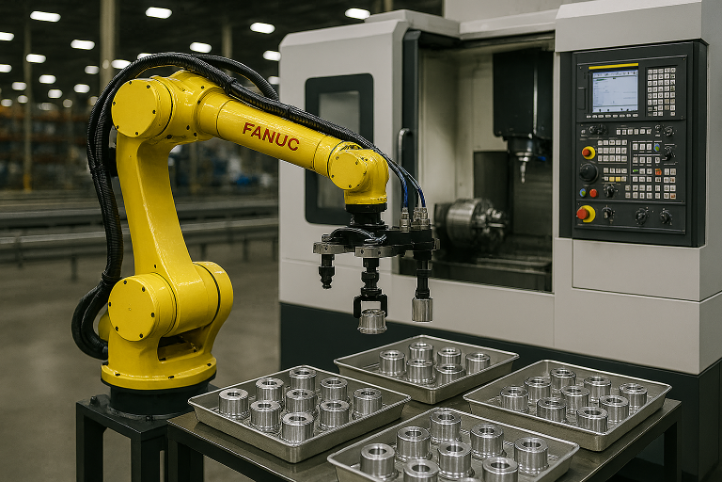
Robotic CNC machine tending is one of the most common entry points into industrial automation for machining operations — and one of the most frequently misexecuted. The technical side of CNC machine tending is well understood: a robot loads a blank into the machine, the CNC runs its cutting cycle, the robot extracts the finished part. What fails in practice is almost never the technology. It is the assumption that installing a robot in front of a CNC machine will automatically improve throughput.
It will not, unless the cell is designed around the machine’s actual rhythm — not the robot’s theoretical speed. When that design discipline is applied from the start, CNC machine tending delivers what it promises: more spindle time, fewer idle gaps, and the ability to run autonomously outside the main shift.
Why CNC Machine Tending Cells Create Bottlenecks
The assumption that a robot will be faster than a human operator is usually correct for the loading and unloading action itself. But in a machining environment, the loading and unloading action is rarely where productive time is lost. The real sources of non-productive time in CNC machine tending are the peripheral tasks that surround the cutting cycle:
- Door opening and closing — on older machines, pneumatic or servo doors can take 3–6 seconds per cycle, which compounds significantly across a shift
- Fixture and chuck jaw cleaning — chips and coolant contamination on seating surfaces cause positioning errors and stoppages
- Part presence and clamping verification — sensors confirming the part is correctly seated before the cycle starts
- Part orientation correction — if blanks arrive inconsistently, the robot needs to reorient before loading
- Finished part evacuation — where the machined part goes after extraction, and how quickly that position clears
- Tray and pallet changes — when the input buffer empties or the output buffer fills, the cell stops until an operator intervenes
If these tasks are not mapped and timed before the cell is designed, the robot ends up waiting on the machine or the machine ends up waiting on the robot. Neither produces parts during that time.
The starting point for any CNC machine tending project is a second-by-second breakdown of the real cycle — not the nominal cycle time from the machine specification. This means measuring: how long does the machining operation actually take? How long does the door take to open and close? How much time does an operator currently spend on loading, unloading, cleaning, and verification? How many times per shift does an unplanned intervention occur?
These numbers define what the cell needs to achieve, and they frequently reveal that the real opportunity is not replacing the loading action but eliminating the idle gaps that surround it.
According to the International Federation of Robotics, machine tending is consistently one of the top five industrial robot applications globally by installation volume — driven specifically by the gap between theoretical CNC capacity and actual spindle utilization in manually tended operations.
Three Variables That Define CNC Machine Tending Performance
1. Part Characteristics
The geometry, weight, surface condition, and orientation tolerance of the part determine the end-effector design, the robot’s approach path, and the cycle time for CNC machine tending loading and unloading.
Handling a raw aluminum blank with generous tolerances is a different problem from handling a finished part with critical machined surfaces. A part arriving from a previous operation with residual chips requires cleaning before loading — either by the robot or upstream. A complex geometry may require a custom fixture to present it to the machine in the correct orientation.
These details must be established before gripper design begins. An end-effector designed without reference to the actual part will require costly modification after commissioning.
2. Internal Cell Logistics
In most CNC machine tending cells, the robot arm is not the constraint on performance. The constraint is the logistics infrastructure around it: how parts are presented to the robot, how finished parts are evacuated, and what buffer capacity exists between the robot’s working speed and the machine’s cycle time.
A robot loading from a stack of trays on a fixed table will stop when the tray empties. If the machine cycle is 4 minutes and tray changes happen every 45 minutes, the cell has roughly 5% downtime from tray changes alone — before accounting for any other interruption. The right solution depends on batch sizes, part number variety, and target autonomy level.
Buffer capacity between the robot and the machine matters equally. If the robot completes its task in 25 seconds and the machine door takes 8 seconds to close before cutting starts, that 8-second idle time is built into every cycle. In a 4-minute machining cycle, that is 3.3% structural idle time — unavoidable, but it needs to appear in the throughput calculation, not be discovered after commissioning.
3. Single Machine or Multi-Machine Architecture
When the machining cycle is long relative to the robot’s CNC machine tending task time, one robot can efficiently serve two or three machines. A robot that takes 30 seconds to load and unload, serving a machine with a 6-minute cutting cycle, is idle for roughly 91% of the machining time — available to serve additional machines.
The calculation is straightforward: add the robot’s task time at each machine plus travel time between them, and verify the total fits within the shortest machining cycle in the group. If the robot cannot complete its tasks at all machines before the first finishes cutting, the architecture creates a bottleneck rather than solving one.
Multi-machine CNC machine tending cells add complexity. More machines means more fault conditions, more sensor states, and more complex recovery procedures. For high-mix operations with frequent changeovers, the added complexity often outweighs the utilization benefit. For stable, long-run operations, multi-machine service is usually the right configuration.
Cell Design Principles That Prevent CNC Machine Tending Bottlenecks
**Design the robot path around the machine, not the other way around.** The machine’s door position, spindle orientation, chuck location, and chip evacuation direction are fixed. The robot’s mounting position and approach trajectory need to work within those constraints — not require machine modifications.
**Keep the end-effector simple and reliable.** Complex multi-function end-effectors look efficient on paper. In practice, they are the most common source of CNC machine tending downtime. A reliable parallel gripper that handles one task correctly, combined with a separate cleaning station if required, will outperform a sophisticated multi-function tool over a production year.
**Size the buffer for the target autonomy level.** If the objective is break coverage — the cell runs during a 20-minute operator break — the buffer needs to hold 20 minutes of production. If the objective is unattended overnight running, the buffer needs to hold an entire shift’s worth of blanks with an automated change mechanism. Define the autonomy target first; let it drive the buffer specification.
**Eliminate double handling.** Any sequence where the robot picks a part, places it in an intermediate position, then picks it again adds cycle time without value. Route parts directly from input to machine to output wherever possible.
**Define fault recovery procedures at design stage.** Every CNC machine tending cell will experience faults — a part not seated correctly, a sensor not triggered, a door that does not open on the first command. The cell design must specify the robot’s response to each fault condition: retry, alarm and stop, or place the part in a quarantine position. A cell that waits for operator intervention on every unexpected sensor reading eliminates the autonomy benefit the automation was supposed to deliver.
Choosing the Right Robot for CNC Machine Tending
For the majority of CNC machine tending applications, a 6-axis articulated robot in the 6–20 kg payload range covers the part weight, reach, and cycle time requirements. The payload must account for both part weight and end-effector weight — a gripper with integrated blow-off cleaning and dual-pick capability can weigh 3–5 kg on its own.
Collaborative robots are increasingly used in CNC machine tending where the layout requires close proximity to operators without full safety fencing. Their speed limitation is acceptable in long-cycle machining applications where loading time is a small fraction of the overall cycle. For short-cycle, high-throughput applications, a conventional robot behind safety guarding delivers better results. For more on cobot machine tending specifically, see our article on collaborative technology for machine tending.
For automotive production environments where CNC machine tending requirements differ from job shop applications, see our article on machine tending robots in automotive production.
For a broader framework on which process in your plant to automate first, see our guide on which process delivers the fastest ROI when robotized.
CNC Machine Tending ROI: Where the Real Value Comes From
The ROI of CNC machine tending is frequently underestimated because the analysis focuses on labor replacement and ignores the more significant value driver: spindle utilization.
A CNC machine that cuts metal for 6 hours out of an 8-hour shift has 75% spindle utilization. The 25% non-cutting time includes loading, unloading, and idle gaps. If CNC machine tending reduces non-cutting time from 25% to 10% — by eliminating operator response delays and allowing the machine to run through breaks — the machine produces 17% more parts on the same equipment without adding a shift.
In machining environments where the CNC represents a significant capital asset and spindle time is the capacity constraint, that 17% output increase has a clear financial value independent of labor cost savings. For a detailed calculation framework, see our article on how to calculate the real ROI when replacing a CNC machine with a robot and spindle.
The secondary ROI drivers compound the spindle utilization argument: reduced handling damage, improved process consistency, the ability to run autonomously during nights and weekends. A cell that runs 16 hours with two operator-attended shifts and 8 hours of unattended autonomous CNC machine tending produces significantly more output than a manually tended machine running a single shift, at a marginal increase in operating cost.
New vs. Refurbished Robots for CNC Machine Tending
CNC machine tending is one of the better applications for a refurbished industrial robot. The operating environment is controlled — indoor, temperature-regulated, with predictable part weights and a defined working envelope. The robot is not exposed to conditions that accelerate wear in foundry or outdoor applications.
A properly refurbished robot — with documented mechanical rebuild, harness replacement, controller diagnostics, and calibration — performs identically to a new unit for CNC machine tending. The 40–60% cost saving relative to new equipment is meaningful when the robot accounts for 25–35% of total cell cost and the remainder goes to end-effector design, safety equipment, and integration engineering.
URT sources and supplies refurbished industrial robots for CNC machine tending across FANUC, ABB, KUKA, and Yaskawa platforms. Models commonly used include the FANUC LR Mate series for compact cells with smaller parts and the KUKA KR Agilus for high-speed applications in tight workspaces.
Pre-Design Checklist for CNC Machine Tending Projects
Before committing to equipment selection, verify this information is documented:
- Actual CNC cycle time measured over a production shift — not nominal specification
- Door open/close time and machine interface protocol (M-code, I/O, fieldbus)
- Part geometry, weight, surface condition, and orientation tolerance
- Input logistics: how blanks arrive and how they are presented to the robot
- Output logistics: where finished parts go and how quickly the position clears
- Buffer requirement based on target autonomy level
- Number of part numbers the cell handles and changeover frequency
- Single vs. multi-machine architecture, validated against cycle time calculations
- Fault recovery: what happens when a part is not correctly seated
FAQ
Should CNC machine tending always involve multiple machines?
No. The decision depends on machining cycle time relative to the robot’s loading and unloading time, the part mix, and changeover frequency. For long-cycle, stable production, multi-machine CNC machine tending improves robot utilization significantly. For short-cycle or high-mix operations, a dedicated single-machine cell is often more stable and easier to manage.
What limits CNC machine tending performance more — the robot or logistics?
In most installations, internal logistics. Part presentation consistency, buffer capacity, chip and coolant management, and finished part evacuation have a larger impact on actual throughput than the robot arm’s speed. Getting logistics right before finalizing the robot specification prevents the most common causes of post-commissioning underperformance.
How do I determine the right buffer size for a CNC machine tending cell?
Start from the autonomy target. If the cell needs to run unattended for one hour, the input buffer must hold at least one hour’s worth of blanks with a mechanism to change or refill without stopping the machine. If the target is overnight autonomous running, the buffer requirement is an order of magnitude larger and may drive the decision toward a conveyor system or automated storage rather than a simple tray stack.
Can collaborative robots be used for CNC machine tending?
Yes, particularly in job shop environments where the layout does not allow full safety fencing and operators work in close proximity to the machine. The speed limitation of cobots is acceptable when the machining cycle is long relative to the loading time. For high-throughput short-cycle applications, a conventional robot with appropriate safety guarding delivers better results.
What machine interface is required to connect a robot to a CNC for machine tending?
Most modern CNCs support CNC machine tending robot integration through M-code outputs signaling cycle complete and door open/close commands, combined with digital I/O for part presence confirmation and clamp status. Older machines may require relay-based interface panels. The machine builder or a qualified integrator can specify the exact interface requirements for a given controller. Confirm this before robot selection — the interface design affects both cell architecture and commissioning timeline.
Talk to URT About Your CNC Machine Tending Project
At URT, we supply industrial robots — new and refurbished — for CNC machine tending applications across job shops, precision machining centers, and automotive component manufacturing.
If you are evaluating whether CNC machine tending fits your operation, which configuration is appropriate for your cycle time and part mix, or which robot models are available within your project budget, contact URT. We will give you a direct, technical answer based on your actual production requirements.